This is where the project stops being plumbing and starts being something I actually use every day. I apologize in advanced, it’s a bit of a longer one. Over the last three posts, I set up Discord, figured out how to pull data from Garmin, and built a database backend to track it all over time. Now it’s time to build the discord health accountability bot that ties everything together.
The goal: a bot that pushes me daily health summaries I can’t ignore (mostly), calls me out when I’m slacking, celebrates when I hit a new personal best, and lets me check my stats on demand with a slash command. Not a dashboard I have to remember to check. Not an app I’ll forget about in a week. Just a persistent presence in a chat I already have open all day. It’s like the motivational friend I always needed (oof… some self insults today).
Here’s how I built it.
The Discord Helper Functions
In Part 1, we sent messages to Discord using inline cURL. That worked fine for testing, but now we’ve got multiple scripts that need to send messages… the daily summary, the weekly report, personal best alerts. Time to wrap that cURL block into a reusable function.
Create a new file called discord_helpers.php in your health bot directory:
<?php

// discord_helpers.php
// Reusable Discord webhook sender and database connection helper.
// Used by daily_summary.php, weekly_report.php, and discord_interact.php.

/**
 * Send a payload to a Discord webhook URL.
 * Returns true on success (HTTP 204), false on failure.
 */
function sendToDiscord(string $webhookUrl, array $payload): bool
{
    // Set a default bot name if the payload doesn't specify one
    if (!isset($payload['username'])) {
        $payload['username'] = 'Health Bot';
    }

    $ch = curl_init($webhookUrl);
    curl_setopt($ch, CURLOPT_POST, true);
    curl_setopt($ch, CURLOPT_HTTPHEADER, ['Content-Type: application/json']);
    curl_setopt($ch, CURLOPT_POSTFIELDS, json_encode($payload));
    curl_setopt($ch, CURLOPT_RETURNTRANSFER, true);

    $response = curl_exec($ch);
    $httpCode = curl_getinfo($ch, CURLINFO_HTTP_CODE);
    curl_close($ch);

    if ($httpCode !== 204 && $httpCode !== 200) {
        error_log("Discord webhook failed (HTTP {$httpCode}): {$response}");
        return false;
    }

    return true;
}

/**
 * Get a PDO database connection.
 * Same pattern from Part 3, wrapped so we don't repeat it everywhere.
 */
function getDb(): PDO
{
    $dsn = 'mysql:host=' . getenv('DB_HOST') . ';dbname=' . getenv('DB_NAME') . ';charset=utf8mb4';
    return new PDO($dsn, getenv('DB_USER'), getenv('DB_PASS'), [
        PDO::ATTR_ERRMODE => PDO::ERRMODE_EXCEPTION,
    ]);
}
Same cURL pattern from Part 1, just wrapped in a function. Discord returns HTTP 204 (No Content) on successful webhook posts, not 200. The function logs failures via error_log() so they show up in your cron logs if something goes wrong.
The username default at the top overrides the webhook’s display name in Discord. Without it, messages show up as whatever you named the webhook when you created it (mine was “Spidey Bot” because apparently past me thought that was funny). Change “Health Bot” to whatever you want, or remove those three lines entirely if you’d rather set the name on the webhook itself in Discord’s channel settings.
The getDb() function is the same PDO connection from Part 3, wrapped so daily_summary.php and weekly_report.php can both use it without duplicating the connection code.
Setting Up the #health Channel Webhook
If you didn’t create a webhook for the #health channel back in Part 1, do it now. Right-click the #health channel in Discord, hit Edit Channel, go to Integrations, and click Webhooks. Create a new one and copy the URL.
Add it to your .env file:
DISCORD_HEALTHCH_WEBHOOK_URL=https://discord.com/api/webhooks/your_id/your_token
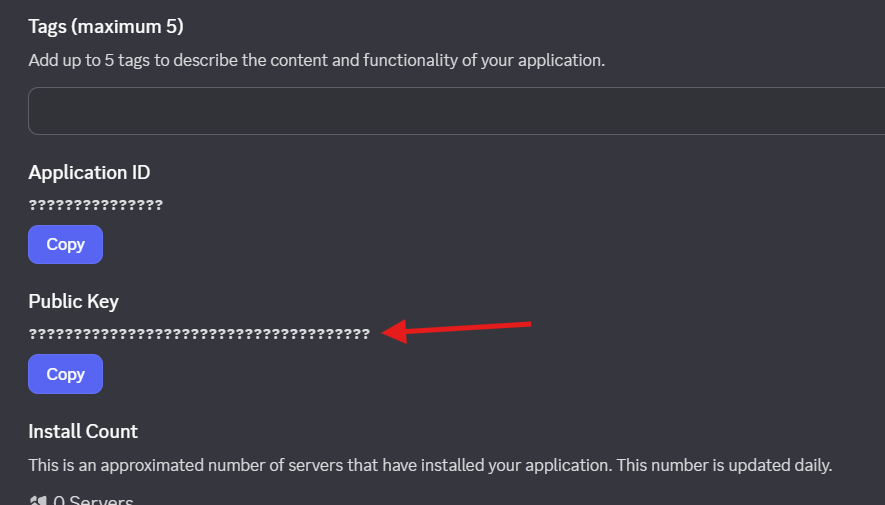
DISCORD_PUBLIC_KEY=your_public_key_from_developer_portal
The DISCORD_PUBLIC_KEY is for slash commands (we’ll get to that later). You can find it in the Developer Portal under your application’s General Information tab.
One Quick Tweak to garmin_pull.php
Before we build the summary, we need to fix a timing issue. The garmin_pull.php script from Part 2 always pulls today’s date. That’s fine for a midday check, but the morning cron runs at 9 AM… and at 9 AM you’ve got maybe 141 steps and zero active minutes. Not exactly a useful summary.
What you actually want is yesterday’s complete data. A full day of steps, sleep, stress, the whole picture.
Open garmin_pull.php and find this line near the top:
$today = date('Y-m-d');Replace it with:
$pullDate = $argv[1] ?? date('Y-m-d');Now the script accepts an optional date argument. Call it with no argument and it pulls today (same as before). Pass a date and it pulls that specific day. The morning cron will pass yesterday’s date, which we’ll set up in the cron schedule below.
One more thing: find the line where $today is used in getWellnessData() and update it to $pullDate. Same for the $data['date'] assignment if it references $today.
That’s it. One variable rename and your pull script is flexible enough for both use cases.
The Daily Health Summary
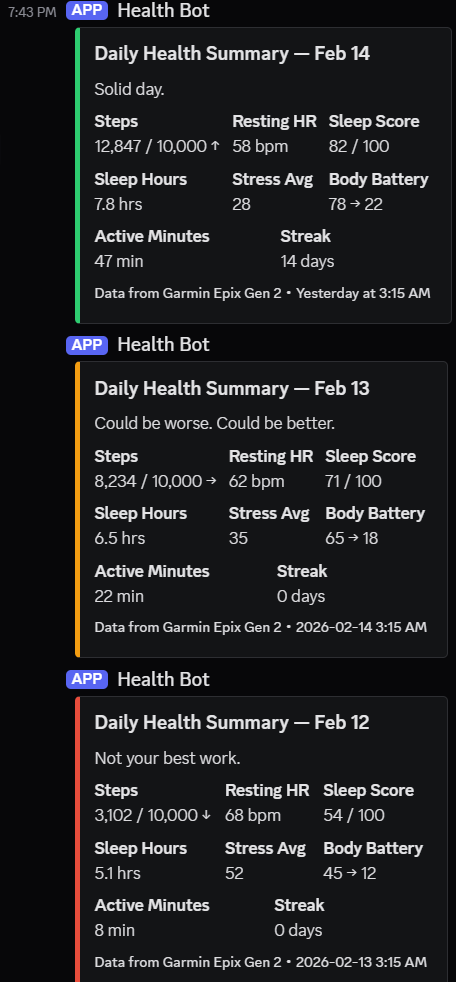
Every morning at 9:15 (after the Garmin pull at 9:00 and database store at 9:05 from Part 3), the bot will post a color-coded summary of yesterday’s health data to the #health channel. Yesterday, because that’s the completed day. By 9 AM today, your watch has barely started tracking. Yesterday has the full picture… every step, every hour of sleep, the final stress average. That’s what the bot reports on.
Green if the day was solid. Yellow for mixed results. Red for “we need to talk.”
Create a new file called daily_summary.php. This is the main daily script that handles the summary, accountability check, and personal best celebrations all in one run.
<?php

// daily_summary.php
// Posts the daily health summary, accountability message, and personal best alerts.
// Runs via cron at 9:15 AM daily.

require_once __DIR__ . '/bootstrap.php';
require_once __DIR__ . '/health_functions.php';
require_once __DIR__ . '/discord_helpers.php';

function getYesterdayData(PDO $db): ?array
{
    $yesterday = date('Y-m-d', strtotime('-1 day'));

    $sql = "SELECT dh.*
            FROM daily_health dh
            INNER JOIN (
                SELECT record_date, MAX(record_time) as latest
                FROM daily_health
                GROUP BY record_date
            ) last ON dh.record_date = last.record_date
                  AND dh.record_time = last.latest
            WHERE dh.record_date = :date";

    $stmt = $db->prepare($sql);
    $stmt->execute(['date' => $yesterday]);

    return $stmt->fetch(PDO::FETCH_ASSOC) ?: null;
}

function buildDailySummary(PDO $db, array $data): array
{
    // Score the day (simple weighted system)
    $score = 0;
    $checks = 0;

    if ($data['steps'] !== null && $data['step_goal'] !== null) {
        $score += ($data['steps'] >= $data['step_goal']) ? 1 : 0;
        $checks++;
    }
    if ($data['sleep_score'] !== null) {
        $score += ($data['sleep_score'] >= 70) ? 1 : 0;
        $checks++;
    }
    if ($data['active_minutes'] !== null) {
        $score += ($data['active_minutes'] >= 30) ? 1 : 0;
        $checks++;
    }
    if ($data['stress_avg'] !== null) {
        $score += ($data['stress_avg'] < 40) ? 1 : 0;
        $checks++;
    }

    $pct = $checks > 0 ? ($score / $checks) : 0;

    // Color coding
    if ($pct >= 0.75) {
        $color = 0x2ECC71; // Green
        $verdict = 'Solid day.';
    } elseif ($pct >= 0.5) {
        $color = 0xF39C12; // Yellow
        $verdict = 'Could be worse. Could be better.';
    } else {
        $color = 0xE74C3C; // Red
        $verdict = 'Not your best work.';
    }

    // Streak info
    $stepStreak = getCurrentStreak($db, 'steps', $data['step_goal'] ?? 10000);

    // Weekly comparison
    $thisWeekSteps = getWeeklyAverage($db, 'steps', 0);
    $lastWeekSteps = getWeeklyAverage($db, 'steps', 1);
    $stepTrend = '';
    if ($thisWeekSteps && $lastWeekSteps) {
        $change = (($thisWeekSteps - $lastWeekSteps) / $lastWeekSteps) * 100;
        $stepTrend = $change > 2 ? ' ↑' : ($change < -2 ? ' ↓' : ' →');
    }

    $stepsDisplay = number_format($data['steps'] ?? 0)
                    . ' / ' . number_format($data['step_goal'] ?? 10000);

    $embed = [
        'title'       => 'Daily Health Summary — ' . date('M j', strtotime('-1 day')),
        'description' => $verdict,
        'color'       => $color,
        'fields'      => [
            ['name' => 'Steps',          'value' => $stepsDisplay . $stepTrend, 'inline' => true],
            ['name' => 'Resting HR',     'value' => ($data['resting_hr'] ?? '—') . ' bpm', 'inline' => true],
            ['name' => 'Sleep Score',    'value' => ($data['sleep_score'] ?? '—') . ' / 100', 'inline' => true],
            ['name' => 'Sleep Hours',    'value' => ($data['sleep_hours'] ?? '—') . ' hrs', 'inline' => true],
            ['name' => 'Stress Avg',     'value' => $data['stress_avg'] ?? '—', 'inline' => true],
            ['name' => 'Body Battery',   'value' => ($data['body_battery_start'] ?? '?') . ' → ' . ($data['body_battery_end'] ?? '?'), 'inline' => true],
            ['name' => 'Active Minutes', 'value' => ($data['active_minutes'] ?? 0) . ' min', 'inline' => true],
            ['name' => 'Streak',         'value' => $stepStreak . ' days', 'inline' => true],
        ],
        'footer'    => ['text' => 'Data from Garmin Epix Gen 2'],
        'timestamp' => date('c'),
    ];

    return ['embeds' => [$embed]];
}
The scoring system is intentionally basic. Four checks (steps vs goal, sleep above 70, active minutes above 30, stress below 40) and a simple percentage determines the color. I didn’t want to over-engineer a scoring algorithm I’d spend more time tweaking than actually using. At least, not yet!
Notice the getYesterdayData() function uses the same INNER JOIN pattern from Part 3’s helper functions. If you’re only running one pull per day right now, the join doesn’t change anything. But if you add midday check-ins later, it grabs the latest snapshot for that day instead of returning multiple rows.
The Accountability Engine
This is the feature that actually makes the discord health accountability bot useful. Anyone can build a dashboard. The difference here is that it doesn’t wait for you to check in. It comes to you.
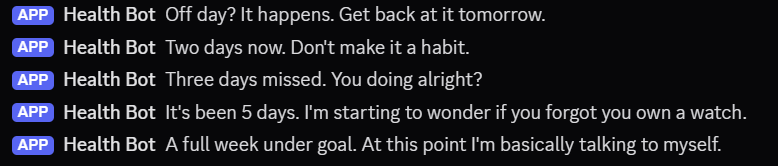
The logic is based on “consecutive misses.” Every day, the bot checks: did you hit your step goal? If not, it increments a counter. The longer the miss streak, the more pointed the message gets.
This function also lives in daily_summary.php:
function getAccountabilityMessage(PDO $db): ?string
{
    $sql = "SELECT dh.steps, dh.step_goal
            FROM daily_health dh
            INNER JOIN (
                SELECT record_date, MAX(record_time) as latest
                FROM daily_health
                GROUP BY record_date
            ) last ON dh.record_date = last.record_date
                  AND dh.record_time = last.latest
            WHERE dh.steps IS NOT NULL
            ORDER BY dh.record_date DESC
            LIMIT 14";

    $stmt = $db->query($sql);
    $rows = $stmt->fetchAll(PDO::FETCH_ASSOC);

    $consecutiveMisses = 0;
    foreach ($rows as $row) {
        if ($row['steps'] < ($row['step_goal'] ?? 10000)) {
            $consecutiveMisses++;
        } else {
            break;
        }
    }

    return match (true) {
        $consecutiveMisses === 0 => null, // All good, no nagging needed
        $consecutiveMisses === 1 => "Off day? It happens. Get back at it tomorrow.",
        $consecutiveMisses === 2 => "Two days now. Don't make it a habit.",
        $consecutiveMisses === 3 => "Three days missed. You doing alright?",
        $consecutiveMisses <= 5  => "It's been {$consecutiveMisses} days. I'm starting to wonder if you forgot you own a watch.",
        $consecutiveMisses <= 7  => "A full week under goal. At this point I'm basically talking to myself.",
        default                  => "{$consecutiveMisses} days. I've run out of clever things to say. Just go for a walk.",
    };
}
The tone escalation is deliberate. Day one is gentle. Day three checks in. By day five it gets sarcastic. By day seven it’s deadpan. I wanted it to feel like a friend who actually cares, not a corporate wellness app sending generic push notifications.
When the message isn’t null, it gets posted to #health right after the summary embed. The combination of seeing your actual numbers plus a pointed comment about your streak… it works. At least it does on me.
Personal Best Celebrations
When the daily pull detects a new personal record (most steps in a day, best sleep score), the bot fires off a message. Nothing over the top. Just a quick acknowledgment. This also runs as part of daily_summary.php, using the checkAndUpdateBest() function from health_functions.php that we built in Part 3.
The celebrations are deliberately understated. I didn’t want confetti emojis and five-paragraph congratulations every time I walked an extra thousand steps. A single line. New record noted. Move on.
The Complete daily_summary.php
Here’s the bottom of the file with everything wired together. The two functions above (buildDailySummary and getAccountabilityMessage) go at the top. This main block goes at the bottom under the functions:
// --- Main ---

$db = getDb();
$webhookUrl = getenv('DISCORD_HEALTHCH_WEBHOOK_URL');
$data = getYesterdayData($db);

if (!$data) {
    sendToDiscord($webhookUrl, [
        'content' => 'No health data for yesterday. Watch not synced?',
    ]);
    echo "No data for yesterday\n";
    exit;
}

// 1. Post the daily summary embed
$summary = buildDailySummary($db, $data);
sendToDiscord($webhookUrl, $summary);

// 2. Post accountability message (if applicable)
$nag = getAccountabilityMessage($db);
if ($nag) {
    sendToDiscord($webhookUrl, ['content' => $nag]);
}

// 3. Check for personal bests
$bests = [
    'steps'       => $data['steps'],
    'sleep_score' => $data['sleep_score'],
];

foreach ($bests as $metric => $value) {
    if ($value === null) continue;

    $msg = checkAndUpdateBest($db, $metric, (float) $value, $data['record_date']);
    if ($msg) {
        sendToDiscord($webhookUrl, ['content' => $msg]);
    }
}

echo "Daily summary posted for " . date('Y-m-d', strtotime('-1 day')) . "\n";
Three require_once statements at the top, the functions in the middle, and this main block at the end. One cron job fires it and it handles everything: summary, accountability, and personal bests in a single run.
Run it from the command line to test: php daily_summary.php. If there’s data for yesterday in the database, you should see the summary pop up in your #health channel.
The Weekly Report
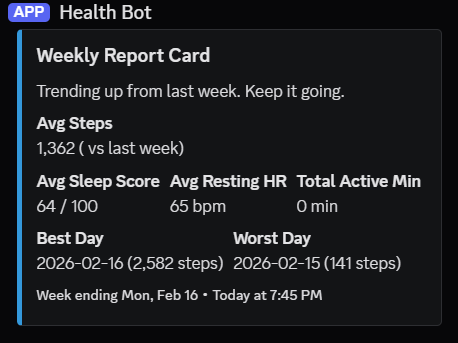
Every Saturday at 8 PM, a separate cron job fires off a weekly summary. This one goes to #health as a longer embed with the full week’s context.
Create a new file called weekly_report.php:
<?php

// weekly_report.php
// Posts the weekly health report card to Discord.
// Runs via cron on Saturdays at 8 PM.

require_once __DIR__ . '/bootstrap.php';
require_once __DIR__ . '/health_functions.php';
require_once __DIR__ . '/discord_helpers.php';

function buildWeeklyReport(PDO $db): array
{
    // Weekly averages using health_functions.php from Part 3
    $thisWeekSteps = getWeeklyAverage($db, 'steps', 0);
    $lastWeekSteps = getWeeklyAverage($db, 'steps', 1);
    $thisWeekSleep = getWeeklyAverage($db, 'sleep_score', 0);
    $thisWeekHR    = getWeeklyAverage($db, 'resting_hr', 0);

    // Total active minutes (SUM, not AVG)
    $activeSql = "SELECT SUM(sub.active_minutes) as total
                  FROM (
                      SELECT dh.active_minutes
                      FROM daily_health dh
                      INNER JOIN (
                          SELECT record_date, MAX(record_time) as latest
                          FROM daily_health
                          GROUP BY record_date
                      ) last ON dh.record_date = last.record_date
                            AND dh.record_time = last.latest
                      WHERE dh.record_date >= DATE_SUB(CURDATE(), INTERVAL 7 DAY)
                      AND dh.active_minutes IS NOT NULL
                  ) sub";
    $totalActive = $db->query($activeSql)->fetch(PDO::FETCH_ASSOC)['total'] ?? 0;

    // Find best and worst days this week
    $sql = "SELECT dh.record_date, dh.steps
            FROM daily_health dh
            INNER JOIN (
                SELECT record_date, MAX(record_time) as latest
                FROM daily_health
                GROUP BY record_date
            ) last ON dh.record_date = last.record_date
                  AND dh.record_time = last.latest
            WHERE dh.record_date >= DATE_SUB(CURDATE(), INTERVAL 7 DAY)
            AND dh.steps IS NOT NULL
            ORDER BY dh.steps DESC";
    $days = $db->query($sql)->fetchAll(PDO::FETCH_ASSOC);

    $bestDay  = $days[0] ?? null;
    $worstDay = end($days) ?: null;

    $stepChange = '';
    if ($thisWeekSteps && $lastWeekSteps) {
        $pct = round(
            (($thisWeekSteps - $lastWeekSteps)
            / $lastWeekSteps) * 100
        );
        $stepChange = $pct >= 0 ? "+{$pct}%" : "{$pct}%";
    }

    $fields = [
        ['name' => 'Avg Steps',       'value' => number_format($thisWeekSteps ?? 0) . " ({$stepChange} vs last week)", 'inline' => false],
        ['name' => 'Avg Sleep Score',  'value' => ($thisWeekSleep ?? '—') . ' / 100', 'inline' => true],
        ['name' => 'Avg Resting HR',   'value' => ($thisWeekHR ?? '—') . ' bpm', 'inline' => true],
        ['name' => 'Total Active Min', 'value' => $totalActive . ' min', 'inline' => true],
        ['name' => 'Best Day',         'value' => $bestDay ? $bestDay['record_date'] . ' (' . number_format($bestDay['steps']) . ' steps)' : 'N/A', 'inline' => true],
        ['name' => 'Worst Day',        'value' => $worstDay ? $worstDay['record_date'] . ' (' . number_format($worstDay['steps']) . ' steps)' : 'N/A', 'inline' => true],
    ];

    // Weekly verdict
    $trend = ($thisWeekSteps ?? 0) > ($lastWeekSteps ?? 0)
        ? 'Trending up from last week. Keep it going.'
        : 'Down from last week. New week, clean slate.';

    return [
        'embeds' => [[
            'title'       => 'Weekly Report Card',
            'description' => $trend,
            'color'       => 0x3498DB,
            'fields'      => $fields,
            'footer'      => ['text' => 'Week ending ' . date('D, M j')],
            'timestamp'   => date('c'),
        ]],
    ];
}

// --- Main ---

$db = getDb();
$report = buildWeeklyReport($db);
sendToDiscord(getenv('DISCORD_HEALTHCH_WEBHOOK_URL'), $report);
echo "Weekly report posted\n";
The weekly report is always blue (neutral). I didn’t want it color-coded like the dailies because it’s more of a reflection tool than a judgment. Best day, worst day, averages, and a week-over-week comparison. Enough data to see the pattern without drowning in numbers.
Notice the getWeeklyAverage() calls. Those are the functions from health_functions.php (Part 3). The total active minutes uses a SUM instead of AVG because “you were active for an average of 34 minutes” is less useful than “you logged 238 active minutes this week.”
Adding Slash Commands
Everything so far is one-way. PHP pushes to Discord via webhooks. But what if you want to ask the bot something? “What’s my current streak?” or “How am I doing so far today?” without waiting for the morning cron?
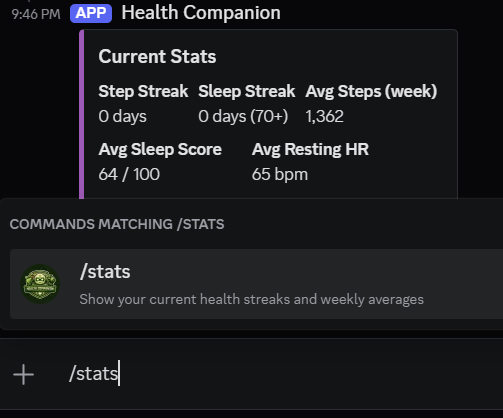
That’s where slash commands come in. When you type /stats in Discord, it sends a POST request to your server. PHP processes it and responds.
This is a different interaction model than webhooks. Discord is calling YOU. That means you need:
- An HTTPS endpoint Discord can reach (your server needs SSL)
- Ed25519 signature verification (Discord signs every request and your server must verify it)
- The commands registered with Discord’s API
Registering the Commands
Run this once to register /stats and /summary with Discord. You can do it from the command line or create a quick PHP script:
<?php

// register_commands.php
// Run this ONCE to register slash commands with Discord.
// php register_commands.php

require_once __DIR__ . '/bootstrap.php';

$botToken = getenv('DISCORD_BOT_TOKEN');
$appId    = getenv('DISCORD_APP_ID');

$commands = [
    [
        'name'        => 'stats',
        'description' => 'Show your current health streaks and weekly averages',
    ],
    [
        'name'        => 'summary',
        'description' => 'Show today\'s health data so far',
    ],
];

$ch = curl_init("https://discord.com/api/v10/applications/{$appId}/commands");
curl_setopt($ch, CURLOPT_HTTPHEADER, [
    'Content-Type: application/json',
    "Authorization: Bot {$botToken}",
]);
curl_setopt($ch, CURLOPT_CUSTOMREQUEST, 'PUT');
curl_setopt($ch, CURLOPT_POSTFIELDS, json_encode($commands));
curl_setopt($ch, CURLOPT_RETURNTRANSFER, true);

$response = curl_exec($ch);
$httpCode = curl_getinfo($ch, CURLINFO_HTTP_CODE);
curl_close($ch);

echo "HTTP {$httpCode}\n";
echo $response . "\n";
Add DISCORD_APP_ID to your .env. You can find it on the same General Information page in the Developer Portal where you grabbed the public key earlier.
Run it once: php register_commands.php. You should see HTTP 200 and a JSON response with your registered commands. Discord caches commands globally, so it might take up to an hour for them to appear in all servers. If you want them instantly for testing, you can register them as guild commands instead (add /guilds/{guild_id} to the URL), but global commands are what you want for the final setup. Took around 45 minutes and a restart of Discord for me.
Setting Up the Interaction Endpoint
Go to your application in the Discord Developer Portal. Under General Information, find the “Interactions Endpoint URL” field. Set it to:
https://yourdomain.com/health-bot/discord_interact.phpDiscord will immediately send a PING to verify the endpoint works. If your file isn’t ready yet, it’ll reject the URL. So let’s build it first, upload it, then set the URL.
The Interaction Handler
This is the file Discord POSTs to whenever someone uses a slash command. It needs to verify the signature, figure out which command was called, and respond.
One prerequisite: the sodium PHP extension. Discord uses Ed25519 signatures and PHP’s sodium extension handles the verification. Most modern PHP installs (7.2+) have it built in. If yours doesn’t, install php-sodium from your package manager.
Create discord_interact.php:
<?php

// discord_interact.php
// Handles Discord slash command interactions.
// Set this as your Interactions Endpoint URL in the Developer Portal.

require_once __DIR__ . '/bootstrap.php';
require_once __DIR__ . '/health_functions.php';
require_once __DIR__ . '/discord_helpers.php';

// --- Read the request body ONCE ---
// php://input can only be read once on most PHP configs,
// and we need it for both signature verification and payload parsing.
$rawBody = file_get_contents('php://input');

// --- Signature Verification ---

function verifyDiscordSignature(string $body): bool
{
    $publicKey  = getenv('DISCORD_PUBLIC_KEY');
    $signature  = $_SERVER['HTTP_X_SIGNATURE_ED25519'] ?? '';
    $timestamp  = $_SERVER['HTTP_X_SIGNATURE_TIMESTAMP'] ?? '';

    if (!$signature || !$timestamp || !$body) {
        return false;
    }

    $message = $timestamp . $body;

    return sodium_crypto_sign_verify_detached(
        hex2bin($signature),
        $message,
        hex2bin($publicKey)
    );
}

// --- Command Handlers ---

function handleStats(PDO $db): array
{
    $stepStreak  = getCurrentStreak($db, 'steps', 10000);
    $sleepStreak = getCurrentStreak($db, 'sleep_score', 70);

    $thisWeekSteps = getWeeklyAverage($db, 'steps', 0);
    $lastWeekSteps = getWeeklyAverage($db, 'steps', 1);
    $thisWeekSleep = getWeeklyAverage($db, 'sleep_score', 0);
    $thisWeekHR    = getWeeklyAverage($db, 'resting_hr', 0);

    $stepTrend = '';
    if ($thisWeekSteps && $lastWeekSteps) {
        $change = (($thisWeekSteps - $lastWeekSteps) / $lastWeekSteps) * 100;
        $stepTrend = $change > 2 ? ' ↑' : ($change < -2 ? ' ↓' : ' →');
    }

    $embed = [
        'title'  => 'Current Stats',
        'color'  => 0x9B59B6, // Purple
        'fields' => [
            ['name' => 'Step Streak',      'value' => $stepStreak . ' days', 'inline' => true],
            ['name' => 'Sleep Streak',     'value' => $sleepStreak . ' days (70+)', 'inline' => true],
            ['name' => 'Avg Steps (week)', 'value' => number_format($thisWeekSteps ?? 0) . $stepTrend, 'inline' => true],
            ['name' => 'Avg Sleep Score',  'value' => ($thisWeekSleep ?? '—') . ' / 100', 'inline' => true],
            ['name' => 'Avg Resting HR',   'value' => ($thisWeekHR ?? '—') . ' bpm', 'inline' => true],
        ],
        'footer'    => ['text' => 'Data as of ' . date('M j, g:i A')],
        'timestamp' => date('c'),
    ];

    return ['embeds' => [$embed]];
}

function handleSummary(PDO $db): array
{
    $today = date('Y-m-d');

    $sql = "SELECT dh.*
            FROM daily_health dh
            INNER JOIN (
                SELECT record_date, MAX(record_time) as latest
                FROM daily_health
                GROUP BY record_date
            ) last ON dh.record_date = last.record_date
                  AND dh.record_time = last.latest
            WHERE dh.record_date = :date";

    $stmt = $db->prepare($sql);
    $stmt->execute(['date' => $today]);
    $data = $stmt->fetch(PDO::FETCH_ASSOC);

    if (!$data) {
        return ['content' => 'No health data for today yet. Has garmin_pull.php run today?'];
    }

    $stepsDisplay = number_format($data['steps'] ?? 0)
                    . ' / ' . number_format($data['step_goal'] ?? 10000);

    $embed = [
        'title'  => 'Today So Far',
        'color'  => 0x3498DB,
        'fields' => [
            ['name' => 'Steps',          'value' => $stepsDisplay, 'inline' => true],
            ['name' => 'Resting HR',     'value' => ($data['resting_hr'] ?? '—') . ' bpm', 'inline' => true],
            ['name' => 'Sleep Score',    'value' => ($data['sleep_score'] ?? '—') . ' / 100', 'inline' => true],
            ['name' => 'Sleep Hours',    'value' => ($data['sleep_hours'] ?? '—') . ' hrs', 'inline' => true],
            ['name' => 'Stress Avg',     'value' => $data['stress_avg'] ?? '—', 'inline' => true],
            ['name' => 'Active Minutes', 'value' => ($data['active_minutes'] ?? 0) . ' min', 'inline' => true],
        ],
        'footer'    => ['text' => 'Requested at ' . date('g:i A')],
        'timestamp' => date('c'),
    ];

    return ['embeds' => [$embed]];
}

// --- Main ---

// Verify Discord's signature on every request
if (!verifyDiscordSignature($rawBody)) {
    http_response_code(401);
    exit('Invalid signature');
}

$payload = json_decode($rawBody, true);

// Type 1: PING (Discord uses this to verify your endpoint)
if ($payload['type'] === 1) {
    header('Content-Type: application/json');
    echo json_encode(['type' => 1]);
    exit;
}

// Type 2: APPLICATION_COMMAND (actual slash commands)
if ($payload['type'] === 2) {
    $commandName = $payload['data']['name'] ?? '';
    $db = getDb();

    $response = match ($commandName) {
        'stats'   => handleStats($db),
        'summary' => handleSummary($db),
        default   => ['content' => 'Unknown command.'],
    };

    // Type 4: CHANNEL_MESSAGE_WITH_SOURCE
    header('Content-Type: application/json');
    echo json_encode([
        'type' => 4,
        'data' => $response,
    ]);
    exit;
}

http_response_code(400);
echo 'Unhandled interaction type';
There’s a lot going on here, so let me break it down.
The $rawBody read at the top is important. PHP’s php://input stream can only be read once on most configurations. We need the body for both signature verification and JSON parsing, so we read it once and pass it around. I burned 20 minutes on a blank verification failure before figuring that one out.
verifyDiscordSignature() checks every incoming request. Discord sends two headers (X-Signature-Ed25519 and X-Signature-Timestamp) with every interaction POST. You combine the timestamp with the request body, then verify the signature against your app’s public key using sodium_crypto_sign_verify_detached(). If the signature doesn’t match, you reject the request with a 401. Discord requires this… they’ll disable your endpoint if you skip verification.
The PING handler (type 1) is how Discord verifies your endpoint when you first set the URL in the Developer Portal. It sends a PING, you respond with {"type": 1}, and Discord knows you’re listening.
The actual commands (type 2) are simple. Check the command name, call the matching function, wrap the response in a type 4 interaction response. Type 4 means “respond with a message that everyone can see.” There’s also type 5 (deferred response) if you need more time to process, but our queries are fast enough that type 4 works fine.
After uploading discord_interact.php to your server, go back to the Developer Portal and set the Interactions Endpoint URL. Discord will PING it immediately. If you get a green checkmark, you’re good.

One thing to note about /summary: it pulls today’s data from the database. But the morning cron pulls yesterday’s date. So /summary only has something to show if you’ve done an additional pull for today. If you want live stats throughout the day, add a second cron entry that pulls today’s data around midday (or whenever you want a refresh). More on that in the cron section below.
New .env Variables
Here’s the full list of what you need to add to .env for Part 4 if you haven’t already:
DISCORD_HEALTHCH_WEBHOOK_URL=https://discord.com/api/webhooks/your_id/your_token
DISCORD_PUBLIC_KEY=your_public_key_from_developer_portal
DISCORD_APP_ID=your_application_id
The DISCORD_BOT_TOKEN should already be in there from Part 2.
Putting the Cron Schedule Together
Here’s the full crontab for the project:
# Garmin data pull (yesterday's completed data)
0 9 * * * /usr/bin/php /home/user/health-bot/garmin_pull.php $(date -d "yesterday" +\%Y-\%m-\%d) >> /var/log/health-bot/garmin.log 2>&1

# Store health snapshot in database
5 9 * * * /usr/bin/php /home/user/health-bot/health_snapshot.php >> /var/log/health-bot/snapshot.log 2>&1

# Post daily summary + accountability + personal bests
15 9 * * * /usr/bin/php /home/user/health-bot/daily_summary.php >> /var/log/health-bot/summary.log 2>&1

# Optional: midday pull for today's live data (for /summary slash command)
# 0 13 * * * /usr/bin/php /home/user/health-bot/garmin_pull.php >> /var/log/health-bot/garmin.log 2>&1
# 5 13 * * * /usr/bin/php /home/user/health-bot/health_snapshot.php >> /var/log/health-bot/snapshot.log 2>&1

# Weekly report (Saturdays at 8 PM)
0 20 * * 6 /usr/bin/php /home/user/health-bot/weekly_report.php >> /var/log/health-bot/weekly.log 2>&1
The morning cron grabs yesterday’s completed data (that $(date -d "yesterday" +\%Y-\%m-\%d) argument we added earlier). The database store runs at 9:05, and the daily summary posts at 9:15. The ten-minute gap gives everything time to finish. The weekly report fires Saturday evening as a standalone job.
The optional midday pull is for the /summary slash command. Without it, /summary won’t have any data for today since the morning cron only pulls yesterday. Uncomment those two lines if you want live-ish data when you type /summary mid-afternoon. Notice the midday pull doesn’t pass a date argument… so it defaults to today.
The slash commands themselves don’t need cron entries. They’re on-demand… Discord hits your endpoint whenever someone types the command.
The Complete File Tree
Here’s what the project looks like after Part 4. Every file and which part created it:
health-bot/
├── .env                     # Credentials (Part 2, updated in Parts 3 + 4)
├── .env.example             # Template (Part 2)
├── bootstrap.php            # Loads .env into getenv() (Part 2)
├── garmin_pull.php          # Pulls from Garmin API (Part 2)
├── health_snapshot.php      # Stores to database (Part 3)
├── health_functions.php     # Streaks, averages, PBs (Part 3)
├── discord_helpers.php      # sendToDiscord(), getDb() (Part 4)
├── daily_summary.php        # Daily embed + accountability (Part 4)
├── weekly_report.php        # Weekly report card (Part 4)
├── discord_interact.php     # Slash command handler (Part 4)
├── register_commands.php    # One-time command registration (Part 4)
├── data/
│   └── daily.json           # Garmin pull output (Part 2)
├── tokens/                  # Garmin OAuth tokens (Part 2)
└── garmin/                  # Garmin PHP library (Part 2)
    ├── Auth1Sign.php
    ├── GarminConnect.php
    └── GarminConnect/
        ├── Connector.php
        └── exceptions/
            ├── AuthenticationException.php
            ├── RedirectException.php
            └── UnexpectedResponseCodeException.php
What’s Actually Different About Using It
I’ve had this running for a couple of weeks now and there are things I didn’t expect.
The accountability messages actually work. Not because the bot is particularly clever, but because it’s persistent. It’s sitting right there in the same Discord app I use for other things. I can’t ignore it the way I ignore a fitness app notification, it’s like its watching me. When I open Discord to check a community or respond to someone, my health bot’s latest message is right there in the sidebar. Unread. Waiting.
The slash commands turned out to be more useful than I thought they’d be. I’ll check /stats mid-afternoon to see if I need to squeeze in a walk before dinner. Takes two seconds and I don’t have to leave the conversation I’m already in.
And the streaks… turns out I’m more competitive with myself than I thought. Seeing “7 days” next to that streak counter and knowing tomorrow could be 8 or back to zero? That’s more motivating than any fitness app badge I’ve ever seen.
Where This Goes From Here
The core is done. The bot pushes daily summaries, nags me when I’m slacking, celebrates personal bests, sends a weekly report card, and answers when I ask for stats. That covers the accountability side.
What it can’t do yet is listen. I want to type “had a chicken caesar salad for lunch” into Discord and have the bot log it. Same for exercise… “ran 30 minutes” and it records it. These would be separate from the Garmin data, but the possibilities get endless at that point. The slash command infrastructure from this post handles the Discord-to-server communication, but food and exercise logging need their own database tables, a nutrition lookup source, some text parsing to figure out what you actually ate, and maybe even an LLM API tie in… hmmm. That’s its own project and probably its own post in the future.
Here’s what’s on the list:
- Food logging via a
/logslash command with calorie estimation - Exercise tracking via
/exercisewith duration and activity parsing - A
/weekcommand for on-demand weekly stats (not just the Saturday cron) - Multi-user support so my partner could use the same bot with separate tracking
- Coffee tracking (because cutting back on Tim Hortons iced caps has been its own journey this year)
The project went from “I’ve never set up a Discord server” to a daily-use tool in about four posts’ worth of tinkering. That’s the part I love about building things. You don’t need a team or a sprint board. You just need a problem, a language you know, and enough stubbornness to wire things together until they work.
If you’ve been following along, I’d love to hear what you build with yours. Swap Garmin for Fitbit. Swap health data for budget tracking. The pattern works for anything you want to track and be nagged about.
My watch is done charging and the bot’s already posted yesterday’s summary. Time to go for a walk before tomorrow’s report gets sarcastic.