In Part 1, I set up a Discord server from scratch and got PHP talking to it through webhooks. That was the easy part. Now I need actual health data to push into those channels… and that means accessing the Garmin Connect API with PHP.
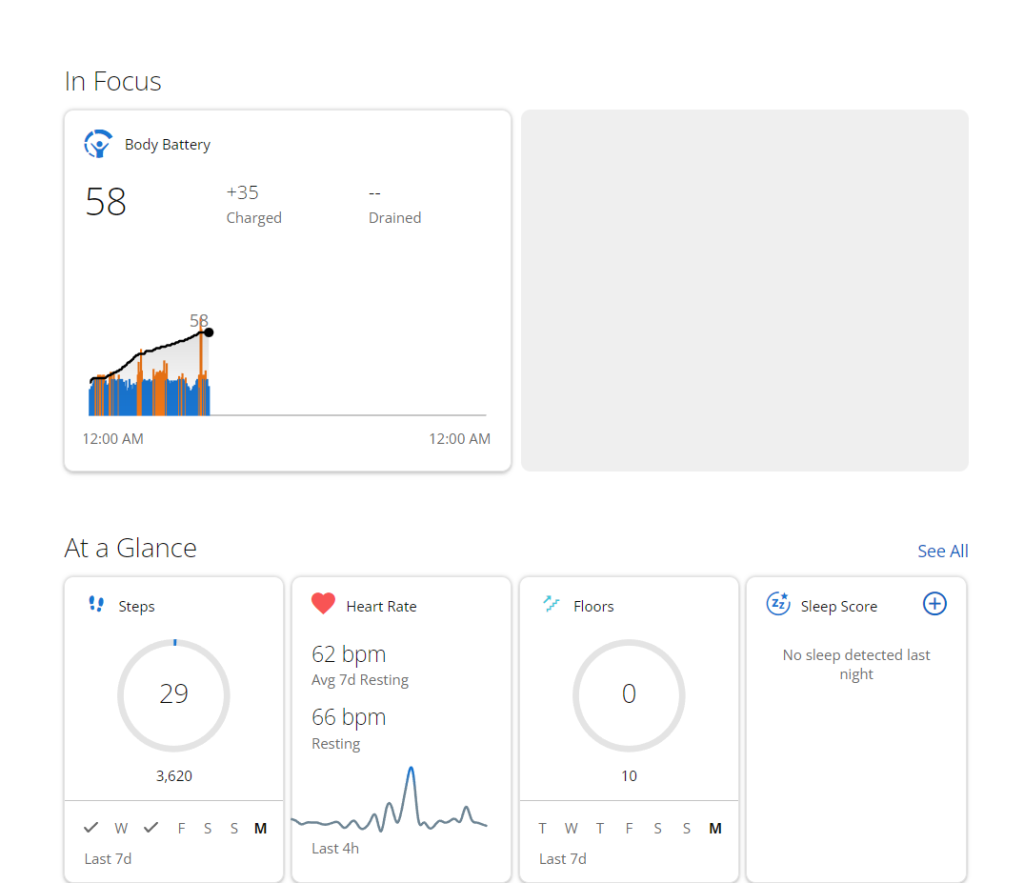
My Garmin Epix Gen 2 tracks everything. Steps, resting heart rate, sleep score, stress levels, Body Battery, active minutes. All of that data syncs to Garmin Connect every morning and throughout the day. Getting it out of Garmin and into my PHP code? That’s where things get painful.
If you’ve ever searched for this, you already know. The Garmin API story for solo developers is a mess. But I found a PHP library that actually works, and I got it running without Composer or any package manager. Here’s how.
The Garmin API Situation in 2026
Garmin has an official Health API. It exists. It’s documented. And you almost certainly can’t use it.
The official API is locked behind a partnership program aimed at health platforms, research institutions, and enterprise companies. You apply, explain your use case, and wait. If you’re a solo developer building a personal health bot… you’re not who they had in mind. I applied anyway (why not?) but I wasn’t going to hold my breath.
So what do the rest of us do? We go unofficial.
Every library that lets individual developers access Garmin data works the same way under the hood: it mimics what the Garmin Connect website does. Your browser logs into Garmin Connect through their SSO system, gets a session, and then calls internal API endpoints to display your dashboards. These libraries automate that same flow. Log in with your credentials, grab the session tokens, and hit the same endpoints programmatically.
The catch? Garmin changes their SSO flow periodically. When they do, the libraries break. Maintainers patch them… sometimes quickly, sometimes months later, sometimes never. It’s a cat-and-mouse game and you need to go in with eyes open.
The PHP Library That Actually Works
After some digging, I landed on 10REM/php-garmin-connect on GitHub. It was updated in January 2026 with a port of the “garth” authentication method, which is the same OAuth flow that Garmin’s own mobile app uses. The whole library is six PHP files. All cURL-based. No framework dependencies.
The one thing it does pull in is Monolog for logging. I don’t need a logging framework for a personal health bot, so I stripped it out and replaced the few log calls with error_log(). Took about ten minutes. Not required though.
Downloading and Setting Up (No Composer)
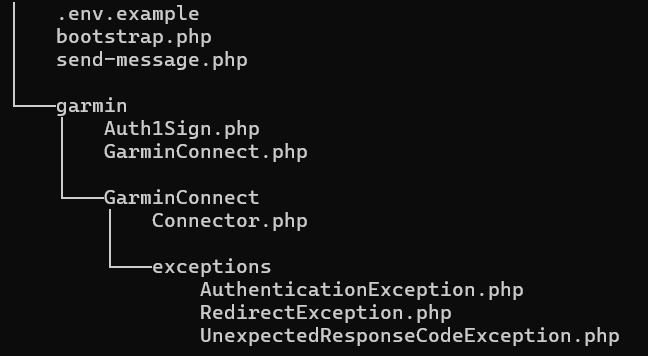
Grab the source files from the GitHub repo. You need everything in the src/dawguk/ directory. Your file structure should look roughly like this:
health-bot/
├── garmin/
│   ├── Auth1Sign.php
│   ├── GarminConnect.php
│   └── GarminConnect/
│       ├── Connector.php
│       └── exceptions/
│           ├── AuthenticationException.php
│           ├── RedirectException.php
│           └── UnexpectedResponseCodeException.php
└── send_message.php
Then just include them manually when we need the library. Old school:
<?php

require_once __DIR__ . '/garmin/GarminConnect/exceptions/AuthenticationException.php';
require_once __DIR__ . '/garmin/GarminConnect/exceptions/RedirectException.php';
require_once __DIR__ . '/garmin/GarminConnect/exceptions/UnexpectedResponseCodeException.php';
require_once __DIR__ . '/garmin/GarminConnect/Connector.php';
require_once __DIR__ . '/garmin/Auth1Sign.php';
require_once __DIR__ . '/garmin/GarminConnect.php';
That’s it. No Composer. No autoloader or No package managers. Six files, six includes.
Review the Code Before You Trust It
After downloading, check Auth1Sign.php for any debug echo statements in the sign() and buildAuthHeader() methods. The version I grabbed had a couple that would dump OAuth signatures to the browser. Comment those out before running anything.
And that brings up a bigger point. You’re about to hand this library your Garmin email and password. Before you do that, read the code. All six files. Its going to take time to go through the whole thing. Look for anything that sends data to URLs that aren’t *.garmin.com. Look for hardcoded endpoints you don’t recognize. Check that credentials are only being sent where they should be.
I reviewed it and it does exactly what it claims. But don’t take my word for it. Don’t take anyone’s word for it. Any time you’re feeding personal credentials into third-party code you downloaded from the internet, you owe it to yourself to know what that code is doing. Six files is small enough to actually read. So read them.
The Consumer Key Secret (That Isn’t Really a Secret)
The library needs a consumer_key and consumer_secret for OAuth authentication. When I first saw that, I assumed it meant applying to Garmin’s developer program. It doesn’t.
These are the same OAuth credentials that Garmin’s own Connect mobile app uses. They’re publicly available through the garth project (the Python library that 10REM ported from). Everyone using these unofficial libraries uses the same keys:
consumer_key:    fc3e99d2-118c-44b8-8ae3-03370dde24c0
consumer_secret: E08WAR897WEy2knn7aFBrvegVAf0AFdWBBF
I added these to my .env file alongside my Garmin credentials. You could also hardcode them since they’re not personal secrets… but I keep everything in .env out of habit.
Keeping Credentials Safe (The .env File Explained)
This matters. You’re storing Garmin login credentials, Discord tokens, and database passwords. If any of that ends up in your code and you accidentally push it to GitHub, it’s game over. Bots scrape public repos for credentials constantly.
The solution is a .env file. If you’ve never used one, it’s simpler than it sounds. It’s just a plain text file that holds your secrets as key-value pairs, and it lives on your server but never in your codebase or anything publicly accessible.
Setting It Up
Create a file called .env in your project root:
[email protected]
GARMIN_PASSWORD=your_garmin_password
GARMIN_CONSUMER_KEY=fc3e99d2-118c-44b8-8ae3-03370dde24c0
GARMIN_CONSUMER_SECRET=E08WAR897WEy2knn7aFBrvegVAf0AFdWBBF
DISCORD_WEBHOOK_URL=https://discord.com/api/webhooks/123456/abcdef
DISCORD_BOT_TOKEN=your_bot_token_here
DB_HOST=localhost
DB_NAME=health_bot
DB_USER=health_bot
DB_PASS=your_db_password
No quotes needed. No export keyword. Just KEY=value, one per line. Lines starting with # are comments.
Reading It in PHP
PHP doesn’t read .env files natively, but you don’t need a library for this. A simple function handles it:
<?php

function loadEnv(string $path): void
{
    if (!file_exists($path)) {
        die(".env file not found at: $path\n");
    }

    $lines = file($path, FILE_IGNORE_NEW_LINES | FILE_SKIP_EMPTY_LINES);

    foreach ($lines as $line) {
        // Skip comments
        if (str_starts_with(trim($line), '#')) {
            continue;
        }

        list($key, $value) = explode('=', $line, 2);
        $key   = trim($key);
        $value = trim($value);

        // Make it available to getenv() and $_ENV
        putenv("$key=$value");
        $_ENV[$key] = $value;
    }
}

// Load it once at the top of your scripts
loadEnv(__DIR__ . '/.env');

// Then use getenv() anywhere
$garminEmail = getenv('GARMIN_EMAIL');
$webhookUrl  = getenv('DISCORD_WEBHOOK_URL');
I put this loadEnv() function in a file called bootstrap.php and include it at the top of every script in the project. One require_once __DIR__ . '/bootstrap.php'; and all my credentials are available through getenv() without being hardcoded anywhere.
Same warning as the Garmin library applies here. Read it. All it does is parse key-value pairs into environment variables. But don’t take my word for it… verify that for yourself before you run anyone’s code that touches your credentials.
The Important Part: Keep It Out of Git
Add .env to your .gitignore immediately:
.envI also keep a .env.example file in the repo with placeholder values so I remember what keys the project needs:
GARMIN_EMAIL=
GARMIN_PASSWORD=
GARMIN_CONSUMER_KEY=fc3e99d2-118c-44b8-8ae3-03370dde24c0
GARMIN_CONSUMER_SECRET=E08WAR897WEy2knn7aFBrvegVAf0AFdWBBF
DISCORD_WEBHOOK_URL=
DISCORD_BOT_TOKEN=
DB_HOST=localhost
DB_NAME=
DB_USER=
DB_PASS=
That way if I set this up on a new machine, I copy .env.example to .env and fill in the real values. The example file is safe to commit. The real one never touches version control.
File Permissions
If you’re self-hosting this on Linux, lock down the permissions on your .env file:
chmod 600 .envThat means only the file owner can read or write it. Nobody else on the system can peek at your credentials.
Pulling Your First Garmin Data
Now that bootstrap.php and .env are in place, we’re almost ready to pull data. But there’s one fix you’ll probably need to make in the library first.
One Fix You’ll Likely Need
The getUser() method in GarminConnect.php points to an outdated endpoint. Several of the data methods call getUser() internally to get your Garmin display name, so if this is wrong, everything downstream breaks with a 404.
Find the getUser() function and change the URL from:
'https://connect.garmin.com/modern/currentuser-service/user/info'to:
'https://connectapi.garmin.com/userprofile-service/socialProfile'Check the GitHub repo first… this might be fixed by the time you’re reading this. But when I set it up, it was still pointing to the old URL.
The Wellness Data Structure
One thing that tripped me up: the wellness data doesn’t come back as flat key-value pairs. It’s nested under a metricsMap object where each metric is an array. So instead of $summary['totalSteps'], you’re looking at $summary['allMetrics']['metricsMap']['WELLNESS_TOTAL_STEPS'][0]['value']. A small helper function makes this less painful.
Sleep data comes back as an array of recent nights (most recent first), not a single object. So today’s sleep is $sleep[0].
The Pull Script
Here’s garmin-pull.php with the correct data paths:
<?php

require_once __DIR__ . '/bootstrap.php';
require_once __DIR__ . '/garmin/GarminConnect/exceptions/AuthenticationException.php';
require_once __DIR__ . '/garmin/GarminConnect/exceptions/RedirectException.php';
require_once __DIR__ . '/garmin/GarminConnect/exceptions/UnexpectedResponseCodeException.php';
require_once __DIR__ . '/garmin/GarminConnect/Connector.php';
require_once __DIR__ . '/garmin/Auth1Sign.php';
require_once __DIR__ . '/garmin/GarminConnect.php';

// Helper to pull a value from the wellness metricsMap
function getMetric(array $summary, string $key)
{
    return $summary['allMetrics']['metricsMap'][$key][0]['value'] ?? null;
}

$credentials = [
    'username'        => getenv('GARMIN_EMAIL'),
    'password'        => getenv('GARMIN_PASSWORD'),
    'consumer_key'    => getenv('GARMIN_CONSUMER_KEY'),
    'consumer_secret' => getenv('GARMIN_CONSUMER_SECRET'),
    'tokenstore'      => __DIR__ . '/tokens/',
];

try {
    $garmin = new \dawguk\GarminConnect($credentials);
    $garmin->login();

    // Pull today's data
    $today = date('Y-m-d');

    $summary    = $garmin->getWellnessData($today);
    $sleep      = $garmin->getSleepData();
    $activities = $garmin->getActivityList(0, 5);

    echo "Steps: " . (getMetric($summary, 'WELLNESS_TOTAL_STEPS') ?? 'N/A') . "\n";
    echo "Resting HR: " . (getMetric($summary, 'WELLNESS_RESTING_HEART_RATE') ?? 'N/A') . " bpm\n";
    echo "Stress: " . (getMetric($summary, 'WELLNESS_AVERAGE_STRESS') ?? 'N/A') . "\n";
    echo "Sleep Score: " . ($sleep[0]['sleepScores']['overall']['value'] ?? 'N/A') . "\n";

    // Save to JSON for other scripts to use
    $data = [
        'date'          => $today,
        'daily_summary' => $summary,
        'sleep'         => $sleep,
        'activities'    => $activities,
    ];

    $outputPath = __DIR__ . '/data/daily.json';
    file_put_contents($outputPath, json_encode($data, JSON_PRETTY_PRINT));
    echo "Data saved to {$outputPath}\n";

} catch (\Exception $e) {
    echo "Garmin pull failed: " . $e->getMessage() . "\n";
    error_log("Garmin pull failed: " . $e->getMessage());
    exit(1);
}
Make sure the tokens/ and data/ directories exist and are writable. The library stores OAuth tokens in tokens/ so it doesn’t have to re-authenticate every single run. First run does the full SSO login. Subsequent runs reuse the stored tokens until they expire.
Run it: php garmin-pull.php
If everything’s configured right, you’ll see your step count, resting heart rate, stress level, and sleep score printed to the terminal. And a daily.json file sitting in your data/ directory with the full response.
One more thing: don’t hammer Garmin. They might flag your account if you’re logging in programmatically too often. Be a good citizen. Pull data a few times a day, not every five minutes. A morning pull after your watch has synced overnight or around your usual mid-day is probably all you need.

What Data Can You Actually Pull?
Once you’ve got the pipeline working, here’s what Garmin Connect gives you access to through the wellness metrics. These are the key names you’ll use with the getMetric() helper:
Daily stats: WELLNESS_TOTAL_STEPS, WELLNESS_TOTAL_STEP_GOAL, WELLNESS_TOTAL_DISTANCE, WELLNESS_TOTAL_CALORIES, WELLNESS_ACTIVE_CALORIES, WELLNESS_BMR_CALORIES, WELLNESS_FLOORS_ASCENDED, WELLNESS_FLOORS_DESCENDED.
Heart Rate: WELLNESS_RESTING_HEART_RATE, WELLNESS_MAX_HEART_RATE, WELLNESS_MIN_HEART_RATE, WELLNESS_MAX_AVG_HEART_RATE, WELLNESS_MIN_AVG_HEART_RATE.
Stress: WELLNESS_AVERAGE_STRESS, WELLNESS_MAX_STRESS. Garmin calculates these from heart rate variability.
Body Battery: WELLNESS_BODYBATTERY_CHARGED, WELLNESS_BODYBATTERY_DRAINED. These are the charged and drained amounts for the day. Really useful for tracking energy patterns over time.
Active Minutes: WELLNESS_MODERATE_INTENSITY_MINUTES, WELLNESS_VIGOROUS_INTENSITY_MINUTES. Split into two types, so add them together for your total.
Sleep data comes from a separate endpoint (getSleepData()) and returns an array of recent nights. Each entry includes sleepTimeSeconds, deepSleepSeconds, lightSleepSeconds, remSleepSeconds, awakeSleepSeconds, and a sleepScores object with an overall score from 0 to 100. You also get SpO2 averages, respiration data, and heart rate during sleep.
Activities come from getActivityList() and include any logged activities (runs, walks, ATV rides in my case) with duration, calories, heart rate zones, and GPS data if applicable.
The JSON responses are nested and sometimes inconsistent. Garmin doesn’t always return every field, especially if you didn’t wear the watch that day or if a particular sensor didn’t get a reading. Your PHP code needs to handle missing data gracefully… lots of null checks and fallback values.
What About MFA?
If you’ve got multi-factor authentication enabled on your Garmin account (and you probably should for normal use), it could complicate the automated login. The library handles some MFA flows, but it typically requires manual intervention the first time… entering a code, authorizing a device, that sort of thing. There isn’t really an elegant solution for this, unless someday Garmin opens up the API access.
What’s Next: Storing the Data
Right now I can pull today’s health data from Garmin and read it in PHP. But that data only represents a snapshot. Tomorrow it’ll be overwritten with new numbers. For trending, streaks, and meaningful accountability (“you haven’t hit 10K steps in two weeks”), I need to store historical data.
That’s Part 3. I’ll set up a MySQL database, build the schema, wire up a cron job that pulls and stores daily, and write the PHP functions for calculating streaks and weekly averages. The data layer that makes the Discord bot from Part 1 actually useful.
Fair warning: if the Garmin API side of this felt like a scavenger hunt, the database part is where it starts to feel like a real project.