At this point in the series, I’ve got Discord set up and I can pull health data from Garmin. Two pieces of the puzzle sorted. But there’s a problem: Garmin only gives you today’s data (and maybe yesterday’s). There’s no “give me the last 90 days” endpoint that reliably works for everything.
If I want my Discord health bot to track Garmin health data with PHP over time… to calculate streaks, spot trends, compare this week to last week, or tell me I haven’t hit my step goal in 7 (ahem, or 30) days… I need to store it myself. Daily pulls, daily inserts, building up history one row at a time.
That’s what this post covers. The database setup, the cron jobs, and the PHP functions that turn raw daily numbers into something the bot can actually use.
Prerequisites
You need MySQL (or MariaDB) installed and running on your server. If you’re on a shared hosting plan, you probably already have it available through cPanel or Plesk. If you’re running your own VPS or homelab box, you’ll need to install it yourself… but that’s a whole separate tutorial.
You also need the PDO extension for PHP. Most PHP installations have it enabled by default. If you’re not sure, create a quick phpinfo() file and look for the PDO section. If it’s not there, you’ll need to install php-mysql (Debian/Ubuntu) or php-pdo (RHEL/Fedora).
Creating the Database and User
If you’ve never set up a MySQL database from scratch, here’s the quick and dirty walkthrough. Log into MySQL as root (or any user with admin privileges):
mysql -u root -pCreate the database and a dedicated user for the health bot. Don’t use root for your application… give it its own user with only the permissions it needs:
CREATE DATABASE health_bot CHARACTER SET utf8mb4 COLLATE utf8mb4_unicode_ci;

CREATE USER 'health_bot'@'localhost' IDENTIFIED BY 'pick_a_strong_password_here';

GRANT SELECT, INSERT, UPDATE, DELETE ON health_bot.* TO 'health_bot'@'localhost';

FLUSH PRIVILEGES;
That gives the health_bot user just enough access to read, write, update, and delete rows in its own database. No CREATE or DROP permissions, no access to other databases. If something goes wrong, the blast radius is limited to the health bot’s data.
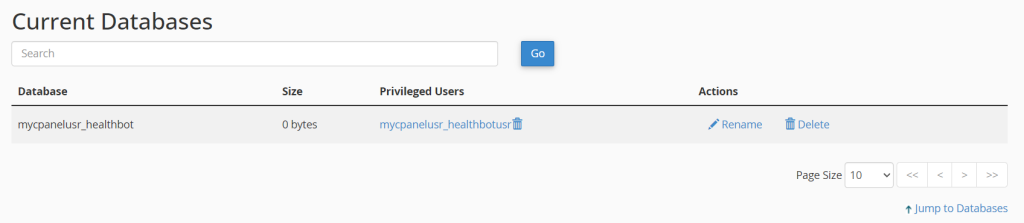
If you’re using cPanel, you can do all of this through the MySQL Databases section instead. Create the database, create the user, then use “Add User to Database” and select only the SELECT, INSERT, UPDATE, and DELETE checkboxes. Though take note that with cPanel, your usernames and database might differ slightly in its naming.
Adding Database Credentials to .env
Back in Part 2, we set up a .env file for Garmin credentials. Add your database details to the same file:
DB_HOST=localhost
DB_NAME=health_bot
DB_USER=health_bot
DB_PASS=use_your_strong_generated_db_password
The bootstrap.php file from Part 2 already loads everything from .env into getenv(), so these values are ready to use. No extra setup needed.
The Database Schema
I’m keeping this simple on purpose. One main table that stores one row per pull. Right now we’re only doing a daily morning pull, but I’m using DATETIME instead of DATE for the record timestamp. That way if you want to add midday check-ins later (a “get off the couch” nudge, maybe), the schema already supports it without a migration.
If a day gets re-pulled (maybe the watch synced late and the numbers changed), the row gets updated rather than duplicated.
CREATE TABLE daily_health (
    id INT AUTO_INCREMENT PRIMARY KEY,
    record_date DATE NOT NULL,
    record_time TIME DEFAULT '06:00:00',
    steps INT DEFAULT NULL,
    step_goal INT DEFAULT NULL,
    resting_hr INT DEFAULT NULL,
    sleep_score INT DEFAULT NULL,
    sleep_hours DECIMAL(4,2) DEFAULT NULL,
    stress_avg INT DEFAULT NULL,
    body_battery_start INT DEFAULT NULL,
    body_battery_end INT DEFAULT NULL,
    active_minutes INT DEFAULT NULL,
    calories_total INT DEFAULT NULL,
    floors_climbed INT DEFAULT NULL,
    created_at TIMESTAMP DEFAULT CURRENT_TIMESTAMP,
    updated_at TIMESTAMP DEFAULT CURRENT_TIMESTAMP ON UPDATE CURRENT_TIMESTAMP,
    UNIQUE KEY uk_date_time (record_date, record_time),
    INDEX idx_record_date (record_date)
) ENGINE=InnoDB DEFAULT CHARSET=utf8mb4;
The record_date and record_time columns are split on purpose. Most of your queries will filter by date only (streaks, trends, personal bests), and DATE comparisons are cleaner than extracting dates from a DATETIME. The compound unique key on both columns means you get one row per pull time per day… so your 6 AM daily summary and a potential 2 PM midday check won’t collide.
Every other column is nullable. That’s intentional. Some days the watch doesn’t sync properly. Some days you don’t wear it. Some sensors don’t return data for whatever reason. The code needs to handle gaps without crashing.
I also added a separate table for achievements and personal bests since those get checked frequently:
CREATE TABLE personal_bests (
    id INT AUTO_INCREMENT PRIMARY KEY,
    metric VARCHAR(50) NOT NULL,
    best_value DECIMAL(10,2) NOT NULL,
    achieved_date DATE NOT NULL,
    created_at TIMESTAMP DEFAULT CURRENT_TIMESTAMP,
    UNIQUE KEY uk_metric (metric)
) ENGINE=InnoDB DEFAULT CHARSET=utf8mb4;
To create these tables, log into MySQL and switch to your health bot database:
mysql -u health_bot -p health_botThen paste both CREATE TABLE statements and hit Enter. You should see Query OK for each one. You can verify they exist with SHOW TABLES; and inspect the columns with DESCRIBE daily_health;.
If you’re more comfortable in phpMyAdmin, open the health_bot database, click the SQL tab, paste both statements, and hit Go.

The Daily Pull Script
This is the script that runs every morning via cron. It reads the JSON file that garmin_pull.php wrote (from Part 2), parses out the fields we care about, and inserts or updates the database row for that date.
<?php

require_once __DIR__ . '/bootstrap.php'; // Loads .env, sets up getenv()

// Same helper from garmin-pull.php
function getMetric(array $summary, string $key)
{
    return $summary['allMetrics']['metricsMap'][$key][0]['value'] ?? null;
}

function getDailyData(): ?array
{
    $jsonPath = __DIR__ . '/data/daily.json';

    if (!file_exists($jsonPath)) {
        error_log('Garmin daily JSON not found: ' . $jsonPath);
        return null;
    }

    $data = json_decode(file_get_contents($jsonPath), true);

    if (!$data || !isset($data['daily_summary'])) {
        error_log('Invalid Garmin JSON structure');
        return null;
    }

    $summary = $data['daily_summary'];
    $sleep   = $data['sleep'][0] ?? [];

    $moderateMin = getMetric($summary, 'WELLNESS_MODERATE_INTENSITY_MINUTES') ?? 0;
    $vigorousMin = getMetric($summary, 'WELLNESS_VIGOROUS_INTENSITY_MINUTES') ?? 0;

    return [
        'record_date'        => $data['date'],
        'record_time'        => date('H:i:s'),
        'steps'              => getMetric($summary, 'WELLNESS_TOTAL_STEPS'),
        'step_goal'          => getMetric($summary, 'WELLNESS_TOTAL_STEP_GOAL'),
        'resting_hr'         => getMetric($summary, 'WELLNESS_RESTING_HEART_RATE'),
        'sleep_score'        => $sleep['sleepScores']['overall']['value'] ?? null,
        'sleep_hours'        => isset($sleep['sleepTimeSeconds'])
                                ? round($sleep['sleepTimeSeconds'] / 3600, 2)
                                : null,
        'stress_avg'         => getMetric($summary, 'WELLNESS_AVERAGE_STRESS'),
        'body_battery_start' => getMetric($summary, 'WELLNESS_BODYBATTERY_CHARGED'),
        'body_battery_end'   => getMetric($summary, 'WELLNESS_BODYBATTERY_DRAINED'),
        'active_minutes'     => ($moderateMin + $vigorousMin) ?: null,
        'calories_total'     => getMetric($summary, 'WELLNESS_TOTAL_CALORIES'),
        'floors_climbed'     => getMetric($summary, 'WELLNESS_FLOORS_ASCENDED'),
    ];
}

function upsertDailyHealth(PDO $db, array $data): bool
{
    $sql = "INSERT INTO daily_health
            (record_date, record_time, steps, step_goal, resting_hr,
             sleep_score, sleep_hours, stress_avg, body_battery_start,
             body_battery_end, active_minutes, calories_total, floors_climbed)
            VALUES
            (:record_date, :record_time, :steps, :step_goal, :resting_hr,
             :sleep_score, :sleep_hours, :stress_avg, :body_battery_start,
             :body_battery_end, :active_minutes, :calories_total, :floors_climbed)
            ON DUPLICATE KEY UPDATE
                steps = VALUES(steps),
                step_goal = VALUES(step_goal),
                resting_hr = VALUES(resting_hr),
                sleep_score = VALUES(sleep_score),
                sleep_hours = VALUES(sleep_hours),
                stress_avg = VALUES(stress_avg),
                body_battery_start = VALUES(body_battery_start),
                body_battery_end = VALUES(body_battery_end),
                active_minutes = VALUES(active_minutes),
                calories_total = VALUES(calories_total),
                floors_climbed = VALUES(floors_climbed)";

    $stmt = $db->prepare($sql);
    return $stmt->execute($data);
}

// Run it
$data = getDailyData();

if ($data) {
    $dsn = 'mysql:host=' . getenv('DB_HOST') . ';dbname=' . getenv('DB_NAME') . ';charset=utf8mb4';
    $db  = new PDO($dsn, getenv('DB_USER'), getenv('DB_PASS'), [
        PDO::ATTR_ERRMODE => PDO::ERRMODE_EXCEPTION,
    ]);

    if (upsertDailyHealth($db, $data)) {
        echo "Health data stored for {$data['record_date']}\n";
    } else {
        echo "Failed to store health data\n";
    }
} else {
    echo "No data available to store\n";
}
The ON DUPLICATE KEY UPDATE is doing the heavy lifting here. If the cron runs twice or if you need to re-pull a day’s data, it just overwrites the existing row instead of creating duplicates. The unique key is on record_date + record_time, so your morning pull always lands in the same slot. If you add a midday pull later, it gets its own row automatically.

Setting Up the Cron Job
The pull needs to run daily, after your watch has synced overnight data to Garmin Connect. I set mine for 9 AM because my Epix Gen 2 typically syncs by 8:00 when I check my phone in the morning and by then I’m usually at work ready to go with a few steps in.
# Pull Garmin data, then store in database
0 9 * * * /usr/bin/php /home/brad/health-bot/garmin_pull.php >> /var/log/health-bot/garmin.log 2>&1
5 9 * * * /usr/bin/php /home/brad/health-bot/health_snapshot.php >> /var/log/health-bot/snapshot.log 2>&1
Two entries. The Garmin pull runs at 9:00, the health snapshot at 9:05. The five-minute gap gives the pull script time to finish writing the JSON file. Could I chain them with && in a single line? Sure. But separate entries mean separate logs, which makes debugging way easier when something breaks and you haven’t had your morning coffee yet.
I’m running this on a lightweight Debian container in my homelab. Nothing fancy. Any Linux box with PHP and MySQL will work.
The Helper Functions: health_functions.php
The database stores raw numbers, but the Discord bot needs context. “You walked 9,000 steps” is boring. “You’ve hit your step goal 12 days straight and your weekly average is up 15%” actually means something.
All the functions that turn raw data into useful insights live in one file: health_functions.php. Create this in your health bot directory alongside garmin_pull.php and health_snapshot.php. Later on we will use it for the daily summary script which will require_once this file to build the Discord messages.
<?php

// health_functions.php
// Helper functions for streaks, trends, and personal bests.
// Used by daily_summary.php (Part 4) to build Discord messages.

/**
 * Get the current streak for a metric that meets a threshold.
 * Walks backwards through daily records, counting consecutive days.
 */
function getCurrentStreak(PDO $db, string $metric, float $threshold): int
{
    $sql = "SELECT dh.record_date, dh.{$metric}
            FROM daily_health dh
            INNER JOIN (
                SELECT record_date, MAX(record_time) as latest
                FROM daily_health
                GROUP BY record_date
            ) last ON dh.record_date = last.record_date
                  AND dh.record_time = last.latest
            WHERE dh.{$metric} IS NOT NULL
            ORDER BY dh.record_date DESC";

    $stmt = $db->query($sql);
    $streak = 0;

    while ($row = $stmt->fetch(PDO::FETCH_ASSOC)) {
        if ((float) $row[$metric] >= $threshold) {
            $streak++;
        } else {
            break;
        }
    }

    return $streak;
}

/**
 * Get the average value of a metric for a given week.
 * $weeksAgo = 0 is the current week, 1 is last week, etc.
 */
function getWeeklyAverage(PDO $db, string $metric, int $weeksAgo = 0): ?float
{
    $startOffset = ($weeksAgo + 1) * 7;
    $endOffset   = $weeksAgo * 7;

    $sql = "SELECT AVG(sub.{$metric}) as avg_val
            FROM (
                SELECT dh.record_date, dh.{$metric}
                FROM daily_health dh
                INNER JOIN (
                    SELECT record_date, MAX(record_time) as latest
                    FROM daily_health
                    GROUP BY record_date
                ) last ON dh.record_date = last.record_date
                      AND dh.record_time = last.latest
                WHERE dh.record_date BETWEEN
                    DATE_SUB(CURDATE(), INTERVAL {$startOffset} DAY)
                    AND DATE_SUB(CURDATE(), INTERVAL {$endOffset} DAY)
                AND dh.{$metric} IS NOT NULL
            ) sub";

    $stmt = $db->query($sql);
    $result = $stmt->fetch(PDO::FETCH_ASSOC);

    return $result['avg_val'] ? round((float) $result['avg_val'], 1) : null;
}

/**
 * Check if a value is a new personal best for a metric.
 * Updates the personal_bests table and returns a message if it's a new record.
 */
function checkAndUpdateBest(PDO $db, string $metric, float $value, string $date): ?string
{
    $sql = "SELECT best_value FROM personal_bests WHERE metric = :metric";
    $stmt = $db->prepare($sql);
    $stmt->execute(['metric' => $metric]);
    $current = $stmt->fetch(PDO::FETCH_ASSOC);

    if (!$current || $value > (float) $current['best_value']) {
        $upsert = "INSERT INTO personal_bests (metric, best_value, achieved_date)
                   VALUES (:metric, :value, :date)
                   ON DUPLICATE KEY UPDATE
                       best_value = :value2, achieved_date = :date2";

        $db->prepare($upsert)->execute([
            'metric' => $metric,
            'value'  => $value,
            'date'   => $date,
            'value2' => $value,
            'date2'  => $date,
        ]);

        $old = $current ? $current['best_value'] : 'none';
        return "New personal best for {$metric}: {$value} (previous: {$old})";
    }

    return null;
}
That’s three functions in one file. Here’s what each one does and how the bot will use them.
Streaks
getCurrentStreak() walks backwards through your daily records and counts consecutive days where a metric meets a threshold. Stop at the first miss. In the next parts, we’ll call it like this:
$stepStreak  = getCurrentStreak($db, 'steps', 10000);
$sleepStreak = getCurrentStreak($db, 'sleep_score', 70);
The INNER JOIN subquery grabs only the latest pull per day. Right now there’s only one pull per day, so it’s technically not doing anything yet. But if you add midday check-ins later via your cron jobs, you don’t want a partial afternoon step count breaking a streak that the end-of-day numbers would’ve kept alive.
The function doesn’t account for skipped days (days where the watch wasn’t worn). You could argue a single missed day should break the streak. I chose not to, because forgetting to charge your watch on a Sunday or taking a rest day shouldn’t erase a two-week run. Rest days are important too! But that’s a personal call.
Weekly Averages and Trends
getWeeklyAverage() calculates a rolling average for any metric over a given week. Compare two weeks to get a trend direction:
$thisWeek = getWeeklyAverage($db, 'steps', 0);
$lastWeek = getWeeklyAverage($db, 'steps', 1);

if ($thisWeek && $lastWeek) {
    $change = (($thisWeek - $lastWeek) / $lastWeek) * 100;
    $arrow  = $change > 2 ? '↑' : ($change < -2 ? '↓' : '→');
    echo "Steps: {$thisWeek} avg ({$arrow} " . round(abs($change)) . "% vs last week)\n";
}
The 2% threshold for trend arrows keeps things from flipping between up and down on tiny daily variations. If you went from 8,200 average to 8,300, that’s basically flat. The arrow should say so.
Personal Bests
checkAndUpdateBest() compares an incoming value against the stored record for that metric. New record? It updates the personal_bests table and returns a message string that the Discord bot can fire off as a celebration. No new record? It returns null and the bot stays quiet.
Every morning when the daily data comes in, the script checks each metric against the stored bests. We’ll wire that up in the next part.
Handling Missing Data
Gaps happen. The watch dies. You forget to wear it. Garmin’s servers hiccup. The cron job fails because your ISP decided that was a great time for “maintenance”.
Every query in this project uses IS NOT NULL filters and null coalescing in PHP. If a day has no data, the streak calculation skips it. The weekly average ignores it. The Discord summary for that day either shows “No data” or doesn’t post at all.
I added a quick health check at the bottom of health_snapshot.php, right after the upsert. It logs a warning if any of the fields I care about came back empty:
// Add this at the bottom of health_snapshot.php, after the upsert
$required = ['steps', 'resting_hr', 'sleep_score'];
$missing  = [];

foreach ($required as $field) {
    if ($data[$field] === null) {
        $missing[] = $field;
    }
}

if ($missing) {
    error_log('Missing Garmin data fields: ' . implode(', ', $missing));
}
Nothing fancy. But it’s saved me from staring at blank Discord messages wondering what went wrong. Check snapshot.log the next morning and it tells you immediately whether Garmin didn’t sync or something in the code broke.
What’s Coming Next
The data layer is built. I can pull from Garmin daily, store it in MySQL, calculate streaks, compare weekly averages, and track personal bests. All the raw material the bot needs.
Part 4 is where it gets fun. That’s where I wire everything into Discord… daily health summaries with color-coded embeds, accountability messages that get progressively more aggressive when I’m slacking, and the conversational features where I can text the bot what I ate or how long I exercised. The bot goes from a data store to an actual companion.
Each layer builds on the last, and suddenly you’ve got something that actually does something useful. The boring plumbing work in this post is what makes Part 4 possible.